Targeting
Targeting decides who sees a flow. Build rules with no code - from a simple page match to a nested set of conditions on user traits, events, device, and more. This page covers every condition and every operator.
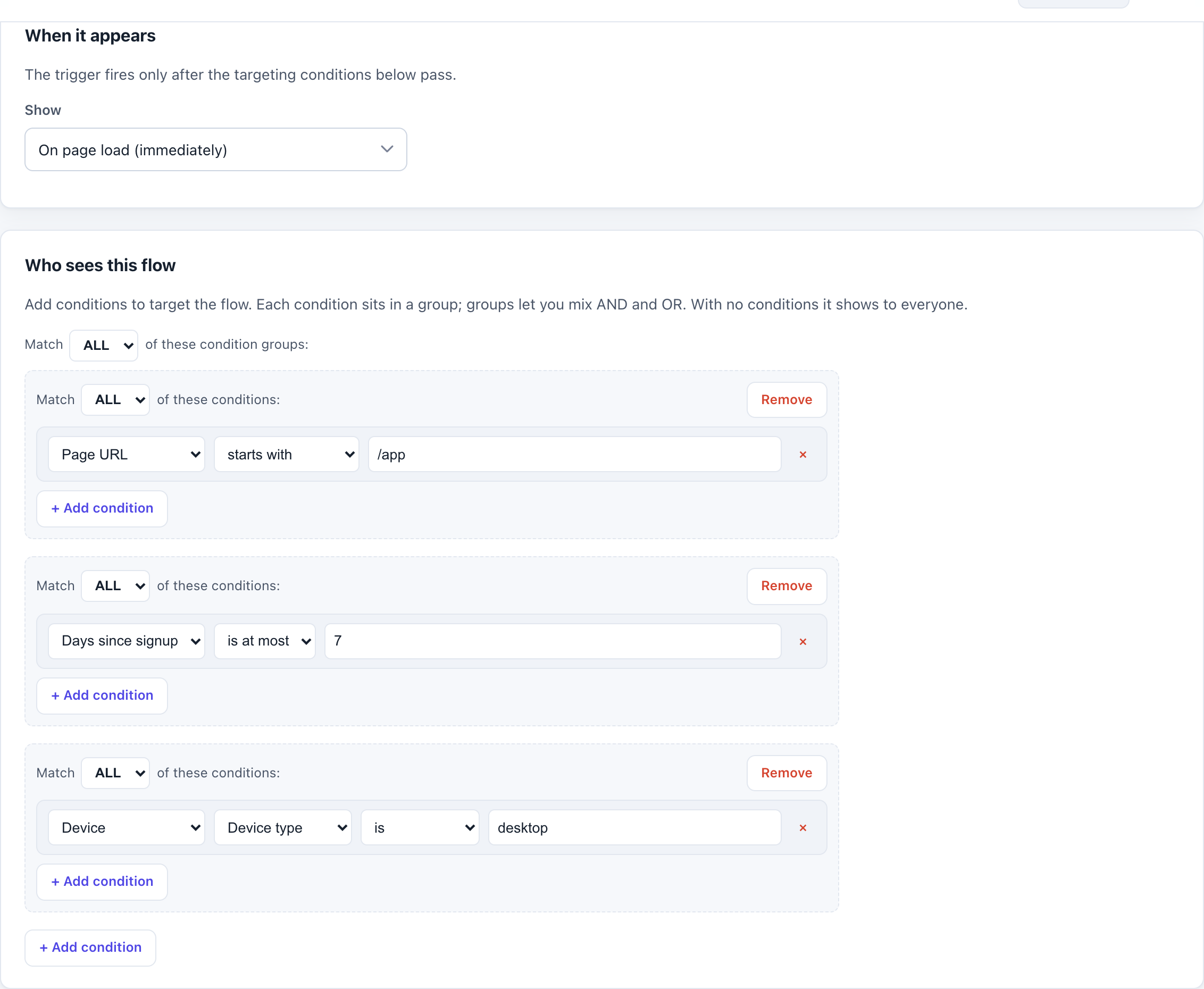
How it works
On the Targeting tab you build a tree of conditions. A flow shows to a user only if the tree passes. Leave targeting empty and the flow shows to everyone (subject to frequency). A rule that depends on data you have not sent never blocks a flow - if a signal is missing, Onbixo errs toward showing.
Condition types
Page
Match the current page URL. Operators: exact (the URL matches exactly), starts
with, contains, and glob (wildcard patterns like
/app/*/settings).
Days since signup
Match how long since the user signed up - ideal for first-N-days onboarding. Operators: at most
(lte), at least (gte), and exactly (eq). Needs a signup date, which you set by
calling identify (or Onbixo uses first-seen as a fallback).
First seen / Last seen
Match on when the user was first or last active - distinct from signup date, which is when they registered. Two modes:
- Relative days: within N days, or more than N days ago. For example, "last seen more than 7 days ago" targets people you want to re-engage; "last seen within 1 day" targets active users.
- On a date: on or after / before a specific calendar date - useful for a fixed cohort, e.g. "first seen before 1 Aug" to reach users who joined earlier.
These read the server-side first/last-seen timestamps from the user's profile. If the profile is unknown (you
have not called identify yet), the condition degrades to "show" so
a flow is never silently hidden.
Visitor (new or returning)
Match whether this is a new visitor (first time on your site in this browser) or a
returning one (been here before). This is browser-local - it uses a first-seen marker stored on
the device, so it works even before identify. Ideal for a welcome flow that only shows to first-time
visitors.
Session count
Match the user's Nth visit - operators at least, at most, and exactly a session number. A session is a visit after 30+ minutes of inactivity (the standard analytics definition), counted per browser. Use it to hold a flow until, say, someone's 3rd session, once they are past the first look.
Seen / completed a flow
Match on whether the user has interacted with a flow. Operators: seen, not seen, completed, not completed. The flow condition targets another specific flow's state (has seen / has not seen / has completed / has not completed).
User attribute / Company attribute
Match any trait you send with identify - a user trait (plan,
role) or a company trait (size, tier). These use the full operator set below.
Event
Match on a behavioral event you send with track. Operators:
did / did not (do it at all), count at least (count_gte) /
count at most (count_lte), and within days / not within days
(how recently). For example: "did created_project at least 1 time within 7 days."
Device / Browser / OS
Match the device type, browser, or operating system. Operators: is, is not, is one of, is not one of. These values are derived on the server, so they cannot be spoofed from the client.
Country / Locale
Match where the user is (country) or their language (locale). Country/device use the server-derived value;
locale adds a starts with operator (e.g. all en locales).
Audience
Reference a saved audience by name. Operators: is in / is not in. Combine it with extra inline rules to narrow further.
Operators (for attributes)
Attribute conditions support a rich operator set. What "value" means depends on the operator:
| Operator | Passes when | Example |
|---|---|---|
| equals / not equals | The trait matches (or doesn't) a value | plan equals "pro" |
| contains / not contains | The trait text includes (or not) a substring | email contains "@acme.com" |
| starts with / ends with | The trait text begins / ends with a value | role starts with "admin" |
| greater than / less than | A numeric comparison | seats greater than 10 |
| is one of / not one of | The trait is (or isn't) in a list | plan one of [pro, team] |
| exists / does not exist | The trait is present (or absent) - no value needed | trialEndsAt exists |
Numeric operators coerce values to numbers; a non-numeric or missing value simply does not block the flow.
AND / OR groups
Combine conditions into groups. A group requires all of its conditions (AND) or any of them (OR), and groups can nest. This lets you express things like:
On the billing page
AND (plan is one of [pro, team]
     OR company size greater than 50)
Preview simulator
The targeting editor includes a simulator: enter sample attributes, events, and device/geo, and it renders a pass/fail result for your whole rule tree - so you can check the logic before publishing.
To target on attributes and events you must identify your users
and track events. Page, device, country, and days-since-signup work
without identify (with a first-seen fallback for the signup date).
Reusing the same conditions across many flows? Save them once as an audience and reference it - edit the audience and every flow using it updates on next publish.
Last updated: Aug 17, 2026