A/B testing
Run two versions of a flow at the same time and let your users settle which one works. Onbixo splits the traffic, reports completion per version, and holds the verdict until there is enough evidence for it. Available on Growth and above.

A test needs traffic to reach a conclusion. If a flow is seen by a handful of people a week, a test on it will take months - the editor tells you when that is the case, so you find out before you wait rather than after.
How it works
- Turn the test on in a flow's A/B test tab. Version B starts as a copy of the flow you already have, so you are never faced with a blank editor. This writes your draft - the test itself begins at step 3, when you publish.
- Change one thing in version B. Use the A / B switcher above the content editor to move between the two versions - it is the same editor, with everything it already does.
- Publish. Both versions go live together, and each new user is assigned to one of them.
- Keep the winner. When there is a result, promote the winning version into your draft and republish.
Nothing reaches your users until you publish, so a half-written version B is never shown to anyone - and no traffic is split until then either. The A/B tab says so while a test is switched on but unpublished.
Change one thing at a time
The single most common way to waste a test is to change several things at once. If version B is shorter and has different wording and a new order, a win tells you the combination worked - not which part of it did, or whether one change was helping while another hurt.
Test one idea per test. Run the next one after.
What you can vary
| Flow type | What version B can change |
|---|---|
| Tour | Step wording, the number of steps, their order, and which element each points at. |
| Tooltip | The message itself - headline, body, and what it asks the user to do. |
| Checklist | The task list: wording, how many tasks, and their order. |
| Announcement | The cards: wording, how many, and their order. |
| Resource center | The help links and relaunchable flows you offer, and how many. |
Targeting, appearance, and frequency are shared across both versions, so every setting you have already tuned keeps applying to the whole test. Both versions reach the same audience under the same conditions, which is what makes the comparison a clean read on the one thing you changed.
Who gets which version
Assignment is sticky: once someone is put into a version, they keep seeing that version every time, so nobody gets a different experience on their second visit. It is also deterministic - the same person always lands in the same version - rather than a fresh coin flip per page load.
By default the split is even, which reaches a result fastest. You can change it under Advanced if you would rather limit how many people see an untested version.
Signed-out visitors
Flows that run before someone signs up can be tested too. Include signed-out visitors is on by default, so a pre-signup flow is measured across everyone who actually sees it. Turn it off if you only want the test to count people who are signed in.
When a winner is called
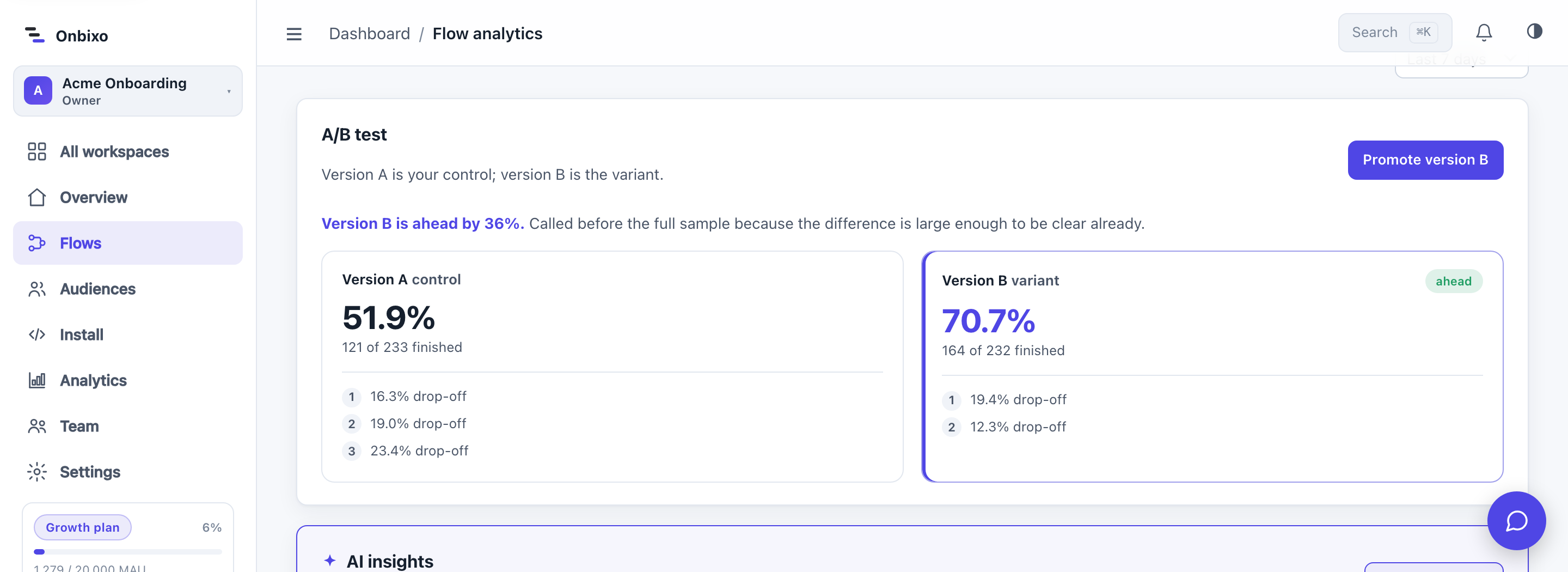
Checking a running test often enough will eventually show a difference that is pure chance. Onbixo sets the sample up front and waits until the evidence is there before calling a result, so the verdict you see is one you can act on.
| Verdict | What it means |
|---|---|
| Still collecting | Not enough people yet. The progress against the target is shown. |
| No real difference | Enough evidence to say the two versions perform the same. A legitimate answer: keep either, and test something bolder next. |
| Winner | One version is genuinely ahead. Promote it when you are ready. |
| Invalidated | A change to one of the versions was published mid-test, so the two were no longer measured against the same thing. End the test, or restart it to measure cleanly from now. |
A large, obvious difference can be called sooner than the full sample. A small one needs the whole sample, or it is not distinguishable from noise.
The sample target
The default is 600 people per version, which detects roughly a 20% relative change in completion - about the size of difference an onboarding change actually produces. Raise it under Advanced to detect a smaller difference, or lower it for a faster, rougher answer.
While a test is running
A test compares the two versions over the same period, so both should stay as they were when it started. Editing a version in your draft is safe - your users keep seeing the published version, and the test carries on unaffected.
What matters is publishing that edit. At that point the people who see the flow from then on get something different from the ones already counted, so we ask first, and you choose:
- Publish and restart the test - the run so far is kept as a record, and measuring starts again from that moment against the new version. Use this when the edit is an improvement you still want tested.
- Publish anyway - the change goes live and the test is marked invalidated: the numbers stay visible, but no winner will be called from them.
- Don't publish yet - leave the change in your draft until the test finishes.
This applies to either version. Changing version B mid-test mixes its own before and after just as changing version A does.
Ending a test
There are two ways to finish, and both keep the result.
Promoting copies the winning version into your draft and ends the test. Nothing changes for your users until you republish, and the previous state is saved in the flow's history, so a promotion can be undone like any other edit.
End test stops it without promoting anything: traffic stops being split, everyone goes back to version A, and what the test found is kept as a record. Version B is kept too, so you can test it again later. This is also the way to close a test that was invalidated - it can never name a winner, so promoting does not apply to it.
If you restart a test, the figures start again from that point. The earlier run is saved separately and is never mixed into the new one, and the analytics date range gains a Current A/B test option (selected by default) so you can tell the two apart.
How you hear about a result
You are emailed and notified in-app when a test reaches a winner, and also when it finishes its sample with no clear difference - a real answer worth knowing, and the one that otherwise looks like nothing happened. Nothing is changed for you; the decision stays yours.
Automatic promotion is available and off by default. With it on, the winner is copied into your draft as soon as there is a result. It still only writes the draft - it never publishes on your behalf.
Generating version B with AI
Not knowing what to test is the usual reason a test never gets run. In the A/B tab, Generate with AI reads the flow's steps and its real drop-off and suggests three specific things worth testing. Pick one, and it writes version B for that idea - changing only what the idea calls for.
Suggestions are free. A credit is charged only when a variant is actually generated, so you can browse ideas without spending anything. Like every AI result in Onbixo, version B lands as a draft for you to review.
Plans
A/B testing is included on Growth and above. On Free and Starter the A/B tab is visible but locked, so you can see what it does before deciding. There is no per-test or per-visitor charge: your bill is the same whether you run one test or twenty.
If a workspace moves below Growth while a test is running, the test stops splitting traffic and everyone sees version A. Nothing is deleted - version B and the results so far are kept, and the test resumes if you move back up.
Related
- Analytics - the metrics a test is measured on.
- The visual editor - where version B is written.
- AI shortcuts - how AI generation and credits work.
Last updated: Sep 1, 2026